
.avif)
An editor can have a powerful media asset management system available and still message a colleague asking, “Do you know where that clip is?” That is usually not a storage problem. It is a sign that the MAM is not yet working naturally enough for the people expected to use it.
The best media asset management programs fit the full media lifecycle and the people doing the work. They keep metadata manageable, automate repeatable enrichment, make search useful and connect storage and production workflows.
Just as importantly, they are easy enough to adopt that the governed way of working is also the easiest way of working.
These ten media asset management best practices focus on how to make a MAM useful every day.
At a glance: the 10 MAM best practices
1. Design around how people actually work
Start by mapping how media really moves through your organization, not how the process is supposed to work on paper.
For a typical video team, the lifecycle may look like:
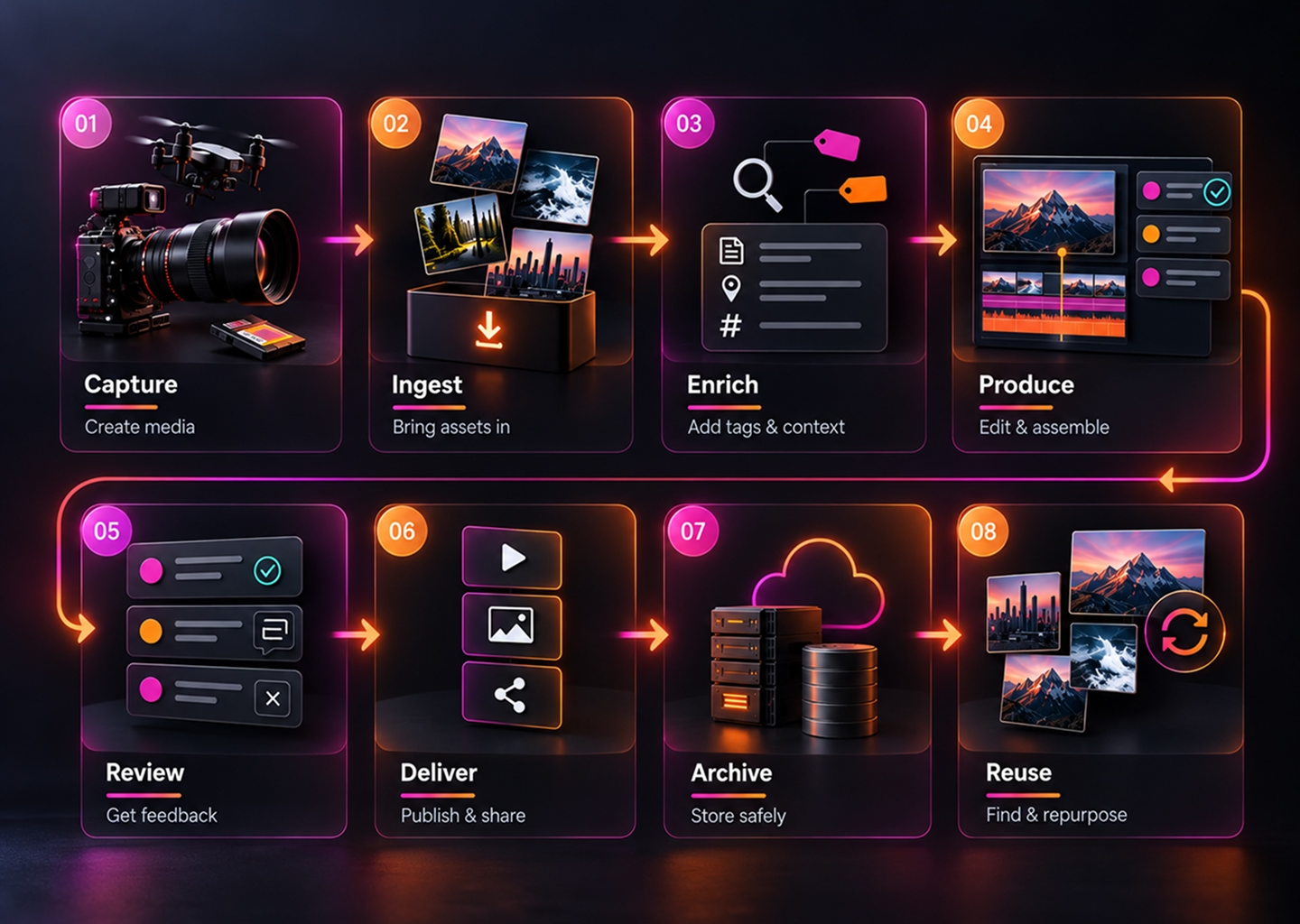
Then look at the handoffs. Who adds project information? When are proxies created? Where does editing begin? Who approves the final version, and what happens after delivery?
Include the workarounds too: shared drives, local folders, chat messages and manual exports. If the MAM adds more steps, people will route around it.
2. Keep required metadata small
It is tempting to create a field for everything you might someday want to know. Long forms often reduce metadata quality because people skip fields, guess or avoid ingest.
Separate information into three groups:
- Required operational metadata: a short set of fields that supports real work, such as project, asset type, rights state or owner.
- Automatically captured metadata: file format, resolution, frame rate, duration and other technical information.
- Enrichment metadata: additional context added later by people, integrations or AI.
Use controlled vocabularies where consistency matters, but keep required input small. The best metadata model is the smallest one that reliably helps people find, govern and move media.
3. Automate enrichment, then review it
Video contains far more useful information than a filename can describe. Transcription, visual recognition, on-screen text and scene detection can make that content searchable without logging every moment manually.
Don't treat automated enrichment as unquestionable truth. Decide what can be accepted automatically and what deserves human review, especially around identity, rights or sensitive classifications.
Use human attention where judgement matters and automate the repetitive work around it.
4. Make search work for people who did not ingest the asset
A weak search test is asking the person who uploaded a file to find it again. They already know the filename, folder and project.
Instead, give another user a real task: “Find the interview where the CEO discusses the European launch,” or “Find the player celebrating after the winning goal.”
Watch how they search. Can they describe what they remember naturally, search across speech and visual context, narrow the results and understand the rights state before reuse?
A useful MAM lets people find media even when they don't know how someone else originally organised it.
5. Match storage policy to access needs
Not every file needs your fastest storage forever. Active media may need immediate access; completed work can move to lower-cost tiers; historical masters may belong in deep archive.
For each tier, define what moves there, who can restore it and how long restoration should take. Do not make archive equivalent to invisible.
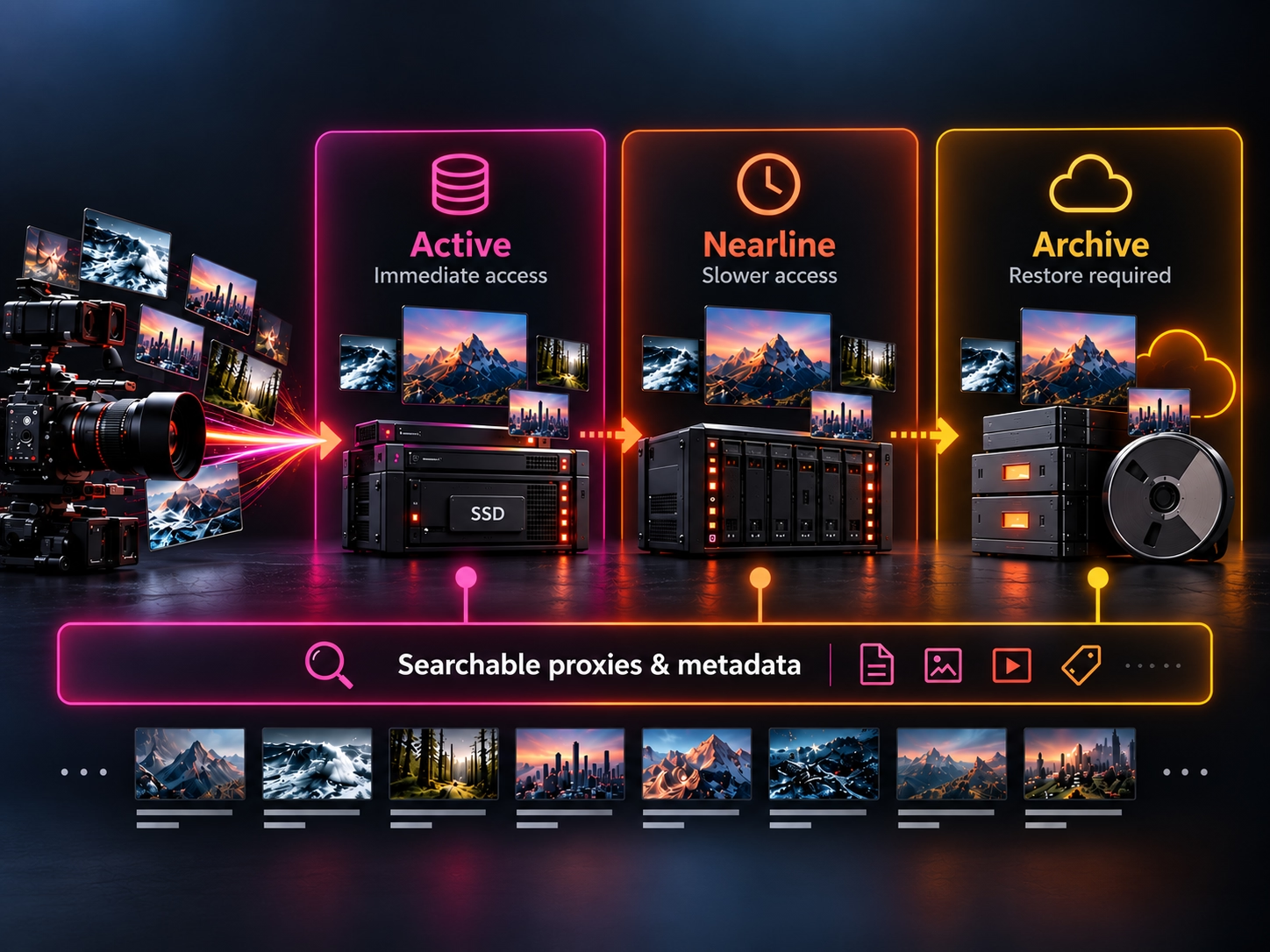
Keeping metadata, thumbnails and proxies available while high-resolution originals sit in colder storage can preserve discovery and editorial access without keeping every original on premium storage.
6. Plan proxy and remote-edit workflows before they become urgent
A remote editor should not need to move hundreds of gigabytes to begin making selects. Proxies let editors work with lightweight media and reconnect to the source when full resolution is required.
Define when proxies are generated, where they live, how they stay linked to originals and how final relinking works, especially when editors and storage are in different locations.
7. Put the library inside the tools people already use
Downloading media into unmanaged folders and uploading new copies later breaks context and creates version risk.
Bring managed media into the creative tools where production already happens. Editors should be able to work with governed media without treating the MAM as a separate administrative destination.
This is an adoption decision as much as an integration decision: reducing context switching makes the managed workflow easier to follow.
8. Make rights and permissions operational
Rights information matters when it changes what people can do. Expiry dates, territory restrictions, talent limitations, embargoes and legal holds should stay attached to media through production and distribution.
Where possible, rights states should trigger actions rather than sit passively in a notes field. For example, an expired asset can be automatically locked so people cannot continue using media after the permitted window ends.
That turns rights metadata from documentation into an operational safeguard.
9. Design for adoption, not just administration
A MAM only creates value if people use it in normal work. Adoption needs to be designed into the operating model, not treated as training after launch.
Look for friction. Do editors have to leave their creative tools to find footage? Are people completing fields they do not understand? Does search require exact terminology? Are common actions hidden behind unfamiliar labels or unnecessary permissions?
The easier route should also be the governed route.
Keep required actions small, give roles sensible permissions, integrate with existing tools and test workflows with real users before rolling them out widely.
Do not measure adoption only by logins. Look at return use, successful searches, reuse and whether teams still fall back to shared drives or local folders.
10. Give the MAM an owner and measure what improves
A MAM needs clear accountability even when responsibility is shared across media operations, IT, production and rights teams.
A practical model can include a MAM owner, metadata steward, storage owner and production sponsors. The point is clear responsibility for improving the operating model as needs change.
Then measure whether work is actually getting better. Useful measures include:
- Search success: can people find what they need?
- Time to find: how long does a typical retrieval take?
- Reuse: how often is existing media used again?
- Duplicate creation: are teams recreating or re-importing assets that already exist?
- Ingest-to-ready time: how quickly does new media become usable?
- Review cycle time: how long does content spend waiting for feedback or approval?
- Archive restore performance: are originals available within the expected window?
- Adoption signals: are target users returning to the MAM instead of bypassing it?
Library size is useful for capacity planning. It is not proof that the MAM is creating value.
A practical MAM health check
Use this checklist when reviewing an existing media asset management program:
- The complete media workflow is documented, including workarounds.
- Required metadata fields have a clear operational purpose.
- Technical metadata is captured automatically where possible.
- AI enrichment has sensible human-review rules.
- Search is tested with realistic findability tasks.
- Storage tiers have clear access and restore expectations.
- Proxies remain linked to source media.
- Editors can work with managed media from their normal production environment.
- Rights and expiry rules affect what users can actually do.
- Roles and permissions are reviewed regularly.
- Adoption friction and bypass workflows are actively tracked.
- One person is accountable for the MAM operating model and its outcomes.
If several of these are missing, the problem may not be the MAM platform itself. The operating model around it may need attention.
Where Evolphin X fits
Evolphin X connects finding, managing, creating, collaborating, delivering and storing media. Teams can keep existing cloud, NAS, on-premises or hybrid storage, enrich media with searchable context and use lightweight proxies for active production.
Rights and license expiry can also be operational. When an asset reaches the end of its permitted usage window, Evolphin X can automatically lock it so users cannot continue using media that is no longer cleared.
The broader goal is to reduce the number of reasons people have to leave the managed workflow in the first place.
Keeping metadata, thumbnails and proxies available while high-resolution originals sit in colder storage can preserve discovery and editorial access without keeping every original on premium storage.